Every invoice as its own PDF
For QuickBooks Online users: one ZIP of named invoice PDFs, plus an index.
See your file names freeNo sign-in. 10 invoices free per company.
Three steps
Pick the dates
Add a customer if you want.
Check the count
Free preview before any download.
Download the ZIP
Named PDFs and an Excel index.
Pay once, by job size
First 10 invoice PDFs of each company
Up to 250 invoices, 30 days, one payment
Up to 1,000, 5,000 or more invoices
USD. Paddle adds any tax at checkout. No subscription.
Questions
Can QuickBooks Online download all invoices as PDFs at once?
QuickBooks Online batch actions print or send a group of invoices. Keeping one PDF file per invoice means opening each invoice and saving it on its own. Invoicecrate saves every invoice in a date range as its own PDF in one ZIP, with an index.
How are the invoice PDF files named?
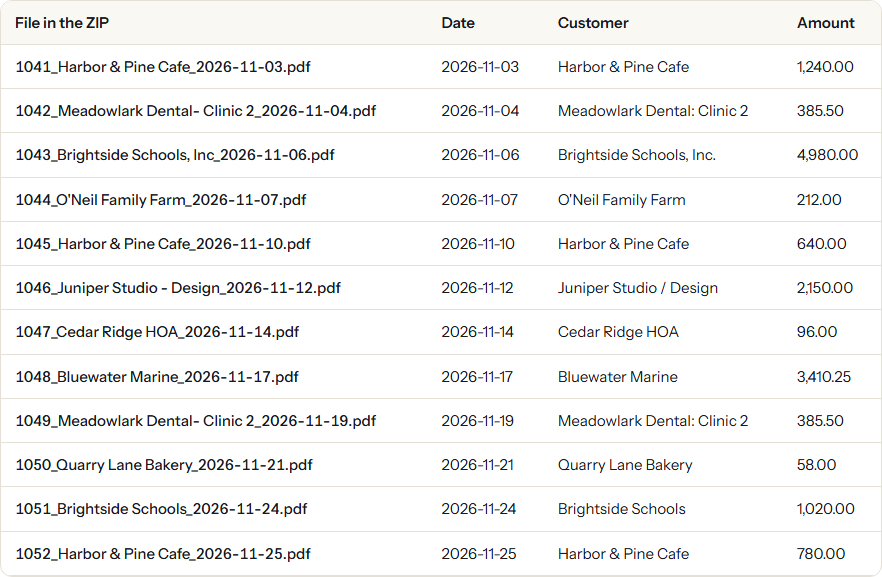
InvoiceNumber_Customer_Date.pdf, for example 1041_Harbor & Pine Cafe_2026-11-03.pdf. The PDF is the one QuickBooks itself produces for that invoice.
What does it cost?
The first 10 invoice PDFs of each company are free. Then a one-time 30-day pass: $29 up to 250 files, $49 up to 1,000, $99 up to 5,000, $199 above that. No subscription.
Does it change anything in my books?
No. The connection only reads from QuickBooks Online. Nothing is edited, sent or deleted.
Why do I sign in to Attachment Bundler?
Invoicecrate runs on Attachment Bundler, our read-only export app for QuickBooks Online. After you sign in with Intuit, choose Invoice PDFs next to your company.